Role(s): Tool Designer
Team Size: 1 person
Game Engine: Unreal Engine 5
Dates: July 2024 - August 2024
Building Interior Generation Tool
A tool that allows designers to create custom buildings
-
Breaking apartment buildings down into modular components that could be connected to each other made the process of creating buildings easy. I had an Actor Component that contained a couple of functions that I could keep using and reusing to create all of the different rooms in the building.
-
I created a naming system that added useful information placed into the name of the object in-engine. Not only did this help massively when troubleshooting and organization, but I was able to extract numbers from the name of the objects, so I didn’t need to use as many arrays and lists to store a bunch of information.
-
My main goal was to have a building generation tool that a non-programmer could use semi-comfortably, and I think I accomplished that. I made a tool that was easy to learn, but could be more complex for more experienced developers.
What I’m trying to say is if my parents understand how it works, then I made it pretty approachable :)
What I Did Right
-
When I was programming how the different rooms were going to be laid out in the apartment, I made the conscious decision to avoid rotation, because I thought that it would make the process way more complicated than it needed to be. Halfway through programming, however, I realized that spending the time to put in basic horizontal and vertical mirroring and rotation would have been way more convenient than having to keep moving around rooms depending on the location of the apartment in the building.
-
There are a couple remnants of it, but I originally came up with the idea of having static building components, which allowed users to “lock” different apartments and floors if they liked what the program randomly generated. This ended up breaking halfway through when I was working on the Geometry Scripting for walls and ceilings, so I scrapped it. Ideally, I would have tried to retrofit it in, but at the time, I saw having a finished v1 as more important than getting every feature in.
-
Each building component is an Actor, which allows them to be selected in the editor and tinkered with. This was definitely useful, but it resulted in a lot of slowdown when trying to generate a new building, because each actor needed to be named, transfer values around, and placed within other actors. I saw this at the time as an unavoidable outcome, but I think maybe fully committing to an Editor Utility Widget might be the answer I’m looking for.
What I Did Wrong
-
Populating the apartments with furniture was a stretch goal I had when brainstorming this idea, and for a bunch of reasons it got cut from the final product. Figuring out randomized positions for furniture while still looking believable would be a massive undertaking, but I would definitely start with trying to figure out some sort of basic pathfinding to make sure no entrance is blocked by furniture. Blatant fire safety violation.
-
Inspired by Insomniac’s Spider-Man games and generally wanting to prevent overdraw on my project, I would love to experiment with interior parallax mapping for my windows, and having them swap out for the real interiors when the player enters the building. Having them be accurate to the interiors would definitely be a challenge though, and the amount of textures needed to convincingly achieve this effect might be more trouble than it is worth.
-
Of course, this is the #1 thing that everyone who has seen this tool has suggested, and I could definitely see the appeal. Expanding this system to cover city blocks, and even entire cities, would be awesome to design and program. I’d be interested in looking at real-life city planes and zoning for inspiration. Having the ability to create different districts with set amounts of population and average income, and having the buildings change in order to reflect those differences would be really cool and incredibly useful for urban open world projects.
What I Could Do Better

As a fun introduction to Unreal Engine 5 programming, I wanted to make an apartment generation tool that I could use the framework for in other projects. I was inspired by Rockstar’s patent on their System and Method for Game Object and Environment Generation, something that I imagine they will be using for Grand Theft Auto VI. I read the patent front to back, taking notes the entire time, and the main takeaways I got from it is that objects are broken down into smaller objects, and that the system itself is incredibly open-ended. Another major inspiration was Epic’s Procedural Content Generation tool, specifically how intuitive it is to generate objects, despite the amount of different variables that can be tweaked. My main goal for this project was to create a tool that paid homage to these companies’ tools, while being significantly less complex.
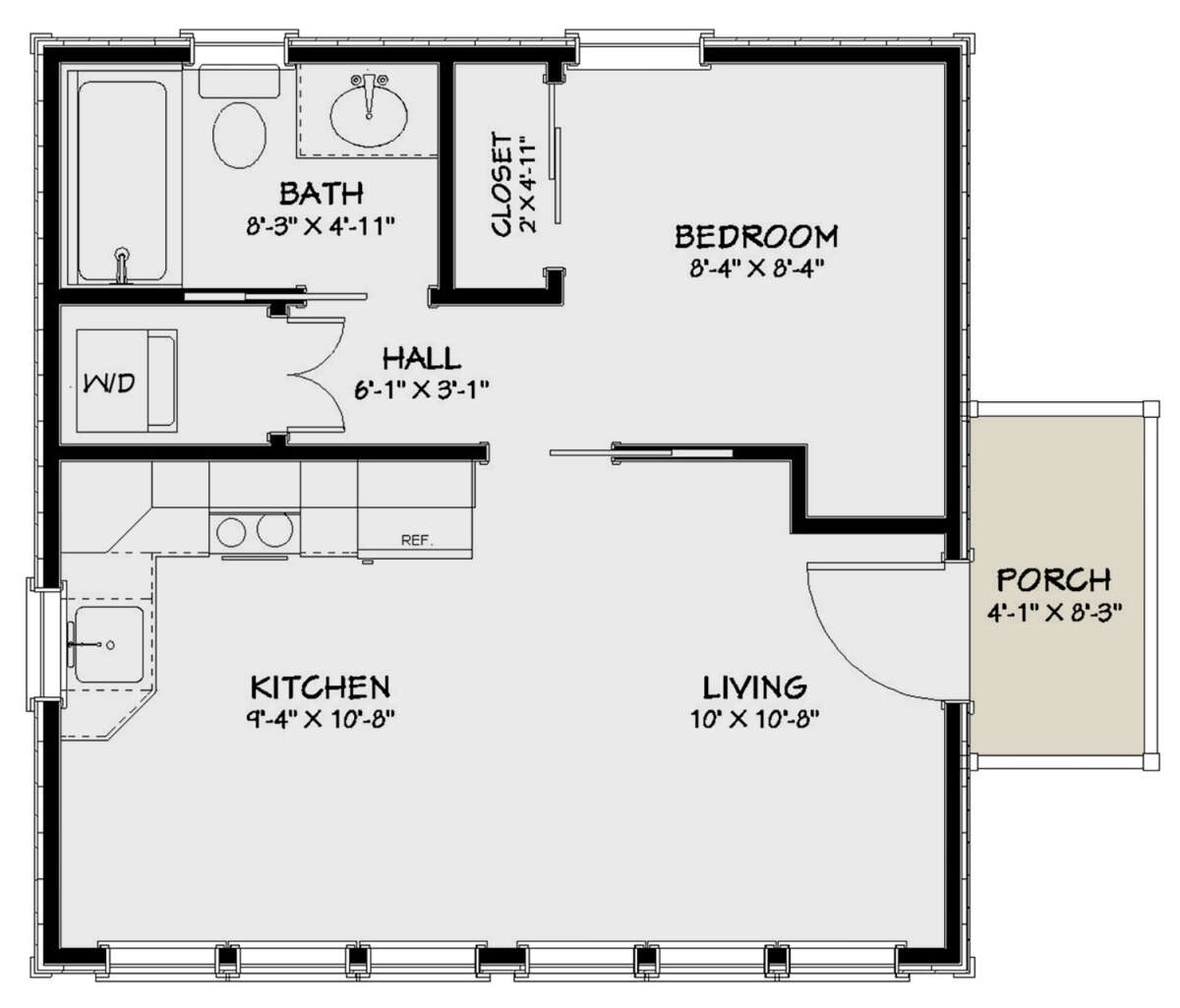
To start, I decided to divide the apartment building into hallways and apartments. From there, I divided each apartment into different rooms, and then generated each of those rooms’ dimensions. In order to lay out these rooms in a believable order, I looked online and found a room layout that looked small, square, and realistic, with a variety of different rooms that I could put in. Altogether, the apartments generate a combined living room and kitchen, and a bedroom, hallway, bathroom, and utility/laundry room. I also programmed some debug features so designers could see how these rooms were laid out in action.


I decided to differ from Rockstar’s tag system of organization, and created a unique numbering system instead. I find the way that Unreal Engine spawns actors in to be incredibly unintuitive, with the actors all being named the same thing, with no real inheritance or organization. In order to solve this, I programmed some basic custom C++ functions that I could incorporate into my visual scripting. I decided to format each object spawned as [ClassName]_[Suffix] (UAID_[PointerAdress]). The reason why I needed to include the UAID into the name was because Unreal would crash when spawning actors of the exact same name. My guess is it has something to do with the way the actors are stored in memory, but I couldn’t figure out exactly why. For the suffix, I decided to number each object, which helped from a programming standpoint, as I had a function that could extract those numbers and let me do things with them. As an example, if I needed to make sure that only the first floor had doors, while the other floors had windows, so my numbering system came in handy.
Create Actor Script

For the meshes that make up the apartment building, I used Unreal’s Geometry Scripting. I made custom functions to try and make creating walls, floors, and ceilings as simple as possible, with lots of variables related to doors, window amount, window size, direction of the wall, material, and whether or not the wall is double-sided, along with many others. The linked visual scripting shows how I generated the living room, and each room in the apartment has different parameters in order to properly generate.
One of my main goals was to make this tool designer-friendly while not skimping out on advanced options if a designer wants to be very specific. With that in mind, I tried to keep technical information to a minimum, with a single button for generating the building, and some floats and vectors to determine appropriate dimensions. For materials, I created an array for each possible material, and the program randomly picks one when generating.


Overall, after 2 months, I created a pretty decent apartment building generation tool! A designer could use this tool for way more time-efficient city generation, because each version of the building blueprint works independently. This project helped expand my programming and visual scripting abilities, in addition to giving me a great crash course on the unique quirks of Unreal Engine. I definitely feel a lot more comfortable messing around with the engine now, and am excited to see what I can create in the future!
Sources:
https://www.houseplans.net/uploads/plans/24628/floorplans/24628-1-1200.jpg?v=032320122644
Garbut, Aaron, et al. System and Method for Game Object and Environment Generation. 10427046, 27 June 2019, p. 20, https://patentimages.storage.googleapis.com/ea/3c/ef/64a2449c5cf244/US20190192972A1.pdf.